Before you start, get these three details ready
Each one takes less than a minute to find in MetaTrader.
- Your account number (login). It's a number, shown at the top of your MetaTrader window. Where to find it
- The exact server name, for example
ICMarketsSC-Live12. Copy it exactly, number included. Where to find it - Your investor password (read-only). It isn't the password you trade with: it can only read. How to create it
These details are often in the account opening email your broker sent you.
Don't have them at hand? Import your MetaTrader 5 statement: no credentials needed.
Find your account number and server
In MetaTrader 5, on a computer
- Look at the title bar, at the very top of the window ①. It shows your account number, then the server name.
- You'll find them again in the Navigator (Ctrl+N), under Accounts ②: the server, then your number just below.

In MetaTrader 4, on a computer
Same idea: the number and the server show in the title bar ①, and in the Navigator, under Accounts ②.

In the MetaTrader mobile app
- On Android, tap the ☰ menu at the top left.
- On iPhone, open the settings tab, the last one at the bottom right.
- Your account shows at the top of the screen, with its number and its server name.
Three traps to avoid
- Copy the server exactly: capitals, dashes and number included.
Live12andLive2are two different servers. - The account number isn't your email address, nor the login for your broker's website.
- A live account and a demo account don't use the same server.
Create your investor password
A MetaTrader account has two passwords. The master password is the one you trade with. The investor password can only read your history: that's the one you give Tradoshi.
Some brokers send it when the account is opened. Otherwise, create it yourself in MetaTrader on a computer: it takes a minute.
In MetaTrader 5
- Open Tools → Options (Ctrl+O), Server tab. Your number ① and your server ② are there too.
- Click Change, to the right of the password ③.

- In the Change Password window, type your master password in Current password ①.
- In Password type, choose Investor, read only ②.
- Type the new password in New password and in Confirm ③, then click OK.

In MetaTrader 4
- Open Tools → Options (Ctrl+O), Server tab. Your number ① and your server ② are there too.
- Click Change, to the right of the password ③.

- Type your master password in Current password ①.
- Select Change investor (read only) password ②.
- Type the new password twice ③, then click OK.

Good to know
- Don't pick the master password in this window: you would change the one you trade with.
- MetaTrader shows the rules at the top of the window: length, digits, capitals.
- Creating the investor password doesn't change your master password.
- No MetaTrader on a computer? Ask your broker's support for your investor password, or import your statement.
Enter them in Tradoshi
- In Tradoshi, open Import / Connect and click + Add an account.
- Type MetaTrader, then pick MetaTrader 5 or MetaTrader 4, depending on your terminal ①.

Pick Auto-sync ①.
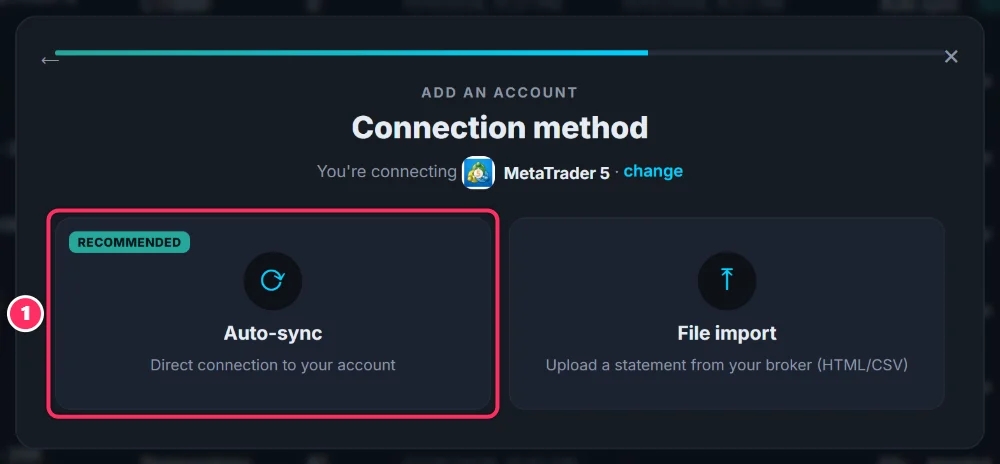
- Type your broker's name in the first field: Tradoshi suggests its servers. Pick yours, or type it in Server ①.
- Enter your Account number ②, then your Investor password ③.
- Click Connect & sync ④.
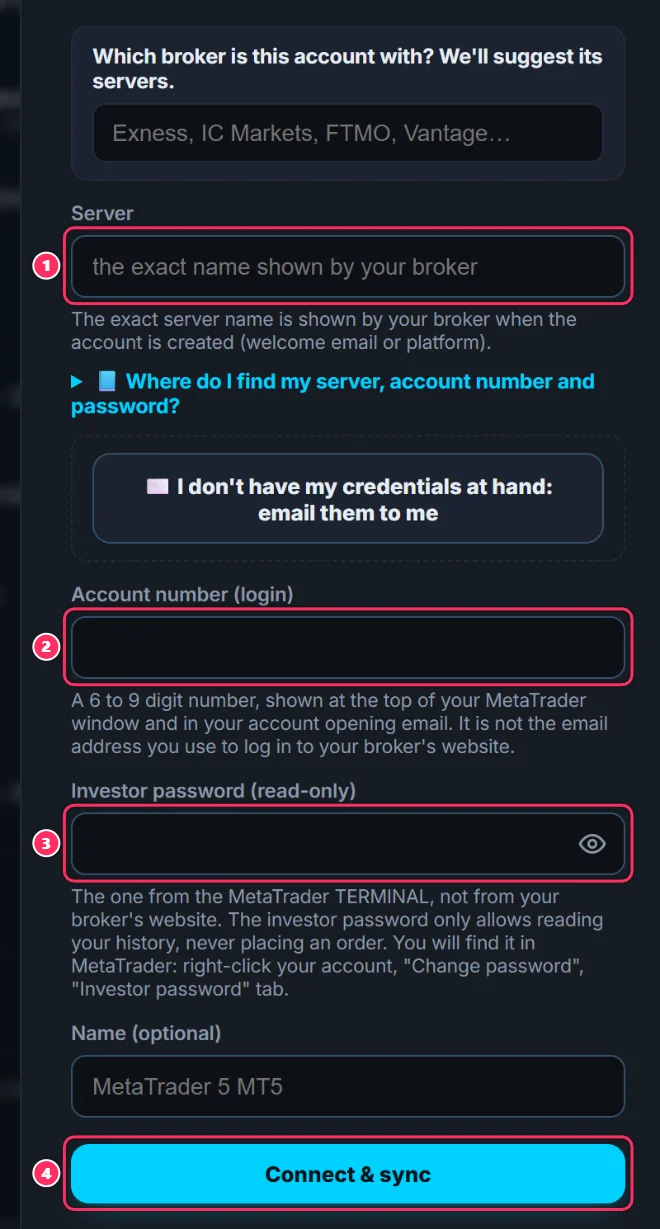
Tradoshi pulls your history, your orders (stop loss included), your currency and your balance. After that, the sync runs on its own, every day.
If the connection fails
- Server not found or rejected: copy the exact name shown in MetaTrader, number included (step 1). Type your broker's name to pick the server from the list.
- Credentials rejected: check that you entered the investor password of the MetaTrader terminal, not the one for your broker's website. Also check that the account number belongs to that server.
- Expired demo account: with most brokers, a demo account stops after a few weeks without a login. The server then rejects the credentials, even correct ones. Open a new demo account, then connect that one.
- My latest trades are missing: run the sync again. It never creates duplicates: a trade that's already imported is skipped.
No credentials at hand? Import your MetaTrader 5 statement
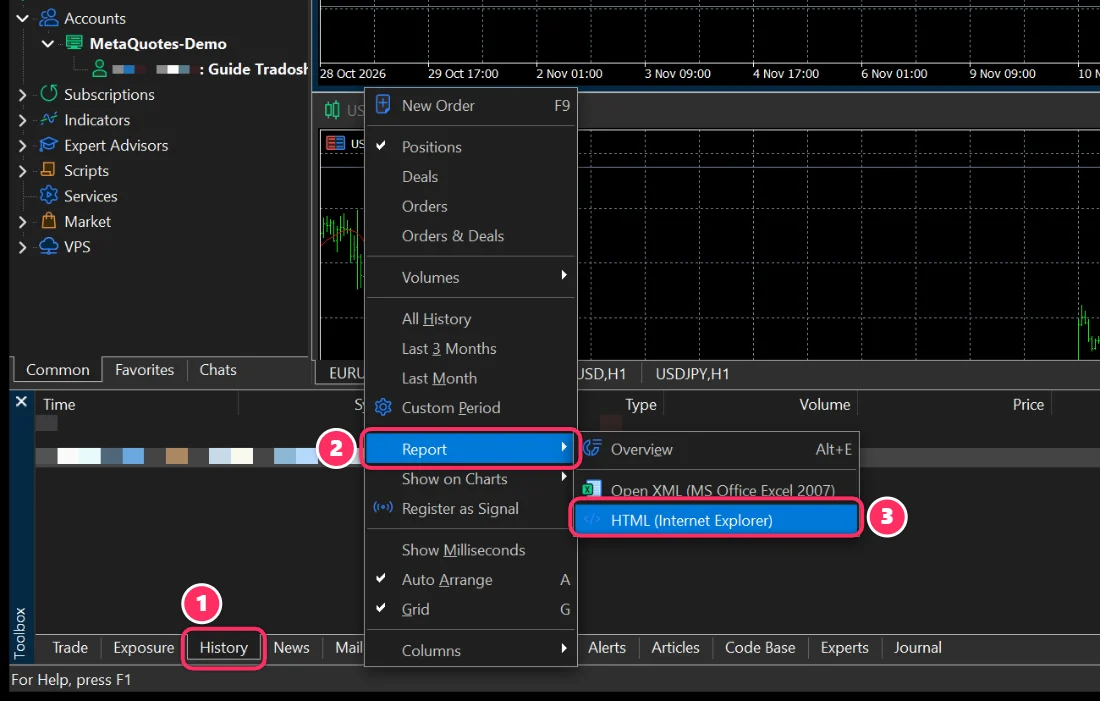
- In MetaTrader 5, open the Toolbox (Ctrl+T), History tab ①.
- Right-click in the list and choose All History, to export the whole period.
- Right-click again, then Report ② and HTML (Internet Explorer) ③. Save the file.
In Tradoshi, open Import / Connect, click Import a file ① and pick that file.

We read your trades, fees included, and recompute everything identically. A statement doesn't update itself: for a journal that's always up to date, connect your account (steps 1 to 3).
Security: what Tradoshi can and cannot do
- Read-only. The investor password cannot place, modify or cancel an order.
- Your password is encrypted server-side, never stored in plain text.
- You can cut access anytime by removing the connection in Tradoshi.